| Description | Transaction ID | Date | Amount |
|---|---|---|---|
Whatsapp conversation starts when the message is sent to the customer and it remains active for the next 24 hours.
e.g. If you send 50 Whatsapp notifications to one customer within 24 hours, you will be charged for one Whatsapp conversation.
You must have notification credits available in your account for WhatsApp and SMS Checkins to work.
All prices are in USD.
Contacting payment processor
It may take upto several minutes.
Contacting payment processor...
We are fetching some information from our payment processor. This process can sometime take several minutes. Please be patient and DO NOT reload this page. We apologize for any inconvenience.

It's ok, we know it is not easy to remember all the credentials.Please click on the link below and we will email the PIN to you.

Always lock the Queue once you are done with the changes. You cannot make changes to the Queue settings once it is Locked
LockOperator name: Operator name
Created: 1st January, 2021
Once you remove this operator, all information data related to this operator will be removed. Please confirm if you want to proceed
Delete this operatorYour professional tier subscription has expired. You need to renew your subsciption to keep on using FlexiQueue services. Please find below all the neccerry information related to renewal

You have encountered a bug. It is unfortunate, we are working to zap it. If you have faced this issue frequently please :TODO
More details:
Let's get started!
It seems you do not have any queue configured. Please click on the button below to create one.
Secure your acccount!

Add an extra layer of security to your account by configuring a unique Administrator's PIN. You will be asked to verify this PIN upon
making any changes to the queue settings.
DO NOT share this PIN with anyone!

Administrator's Pin
Select a 4 digit pin to protect your Admin Panel. You will need to authenticate provide this PIN to make any change in the queue.
Please DO NOT share this PIN with anyone.

Select the country
Select which the country of your business. If you are running business in muiltiple countries, slect the country where your Head Office is located.
Queue is still running in the QueueManager, you can access the Queue Settings portal only when the Queue is in stopped state.
Please go to the "Queue Manager" and stop the Queue.
Queue Manager

You are just a click away from setting up the queue. Please click on the button "Create Queue" to complete this step.
Chatbot engages with your client through interactive conversation and gather information from them while they are waiting for their turn.
Queue Settings
Configure user interaction settings in this section.
If Selected Users can lower their position in the waiting queue if they are not ready.
If Not Selected Users will be able to lower their position in the queue.
If Selected Users can fetch the estimated wait time in the Queue..
If Not Selected Users cannot check the wait time. They can still find their queue position.
If Selected Multiple Q.
If Not Selected Users cannot check the wait time. They can still find their queue position.
If Selected Queue Administrator will be able to assign incoming users to it's staff.
If Not Selected Staff/Operators will serve users from the main Queue only.
If Selected Users will be sent SMS Notifications each time their status in the queue changes. If they have not linked the chatbot.
If Not Selected User will be send SMS Notification only when they are added in the queue.
If Selected Operator related function e.g. Start/Stop an operator, Serve Customer, Take new customer etc can be done from Queuemanager portal.
If Not Selected Operator related functions needs to be carried out from Operator portal.
Queue length is the maximum number of users that can be in a queue at a time.Once the queue is full, no new users can be added.
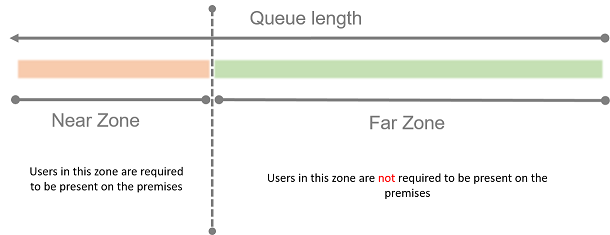 Queue length is the maximum number of users that can be in a queue at a time.Once the queue is full, no new users can be added.


click here to renew your Subscription
Operator or Queue operator is your employee that serves the users from the Queue.
Why create an operator?Every Queue has on operator at start. If you have more staff in your business, you can create one operator for each staff.
If you have allowed customers to select their serving operator,they will be able to see the operator name, gender, image(if uploaded) and approximate wait.
Operator PIN is a 4 digit number that let's you secure your account. Keep this number in a secure place.
Images are great way of sending information to your customers.If you have allowed customers to select their serving operator,they will be able to see the operator name, gender, image(if uploaded) and approximate wait.
Adjust the square on the image so that the operator face is in the center and then click upload.
FlexiQueue Professional Tier is packed with premium features, components, and more!
Upgrade to Pro!Queue is not stopped!
Unable to add new operator!
Upgrade Required!